

Getting data out depends on one person.
The data fabric connects to IBM i and keeps a current copy of the tables you choose, so a report does not wait on whoever knows the right queries.
For AS/400 teams
The system of record does its job. The trouble starts when someone needs an answer, and it means another query, another export and another spreadsheet. Beye connects to IBM i, keeps the data current and turns that work into tools the whole team can run.
Green screens welcome. 😉
001 / The export loop
The numbers are on the IBM i. The work happens somewhere else.
The data fabric connects to IBM i and keeps a current copy of the tables you choose, so a report does not wait on whoever knows the right queries.
Updates recur as the business runs. How often each table updates depends on the source and how it is set up.
Turn it into a tool with inputs and a Run button. The team runs the same logic, not their own copy.
Queries against the source run with time limits and are cancelled if the connection drops.
You do not have to. Beye works from a current copy of the data you choose, and the IBM i keeps doing its job.
We can show you that the copy matches the source, with counts and totals over old and recent date ranges.
002 / The history
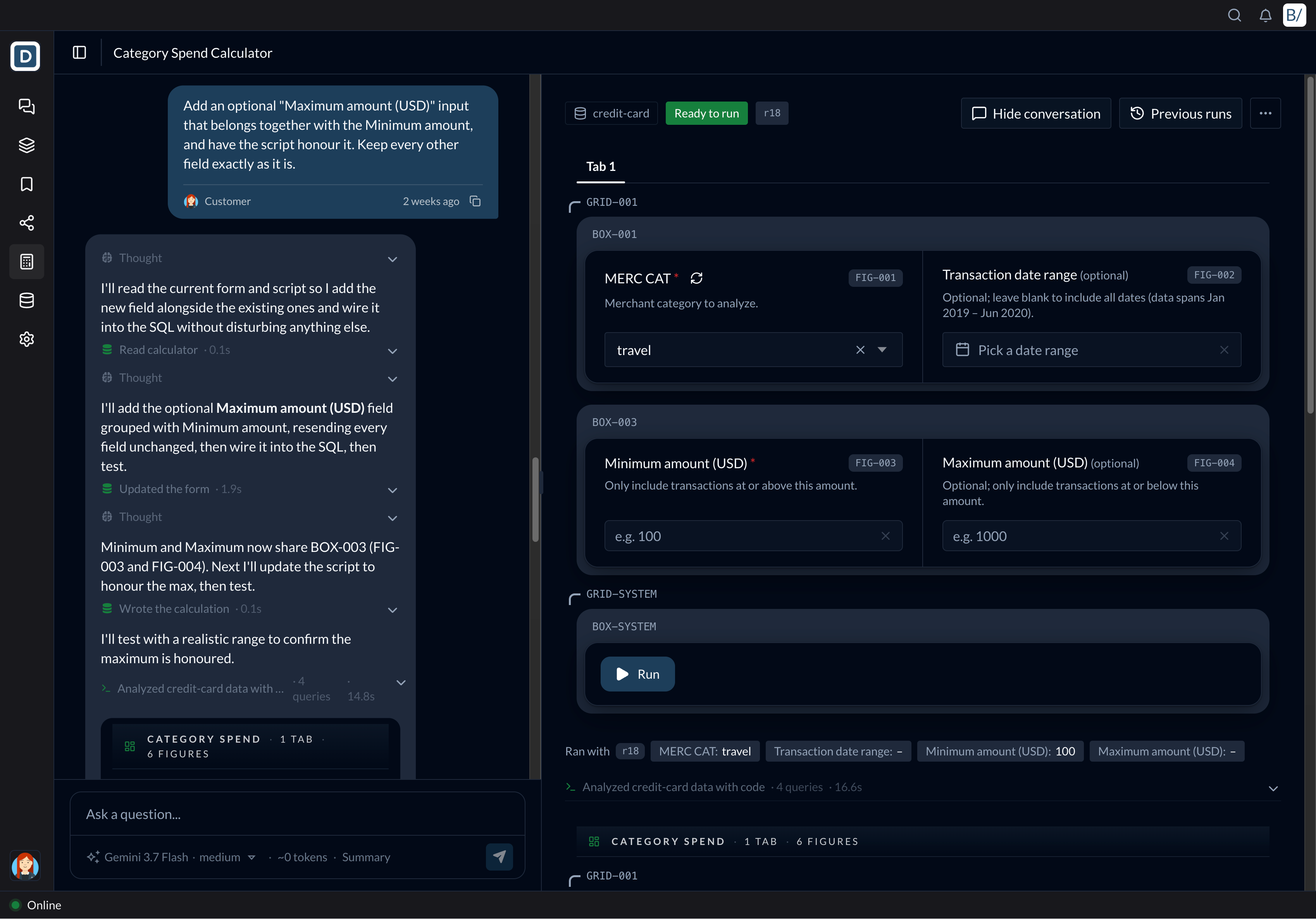
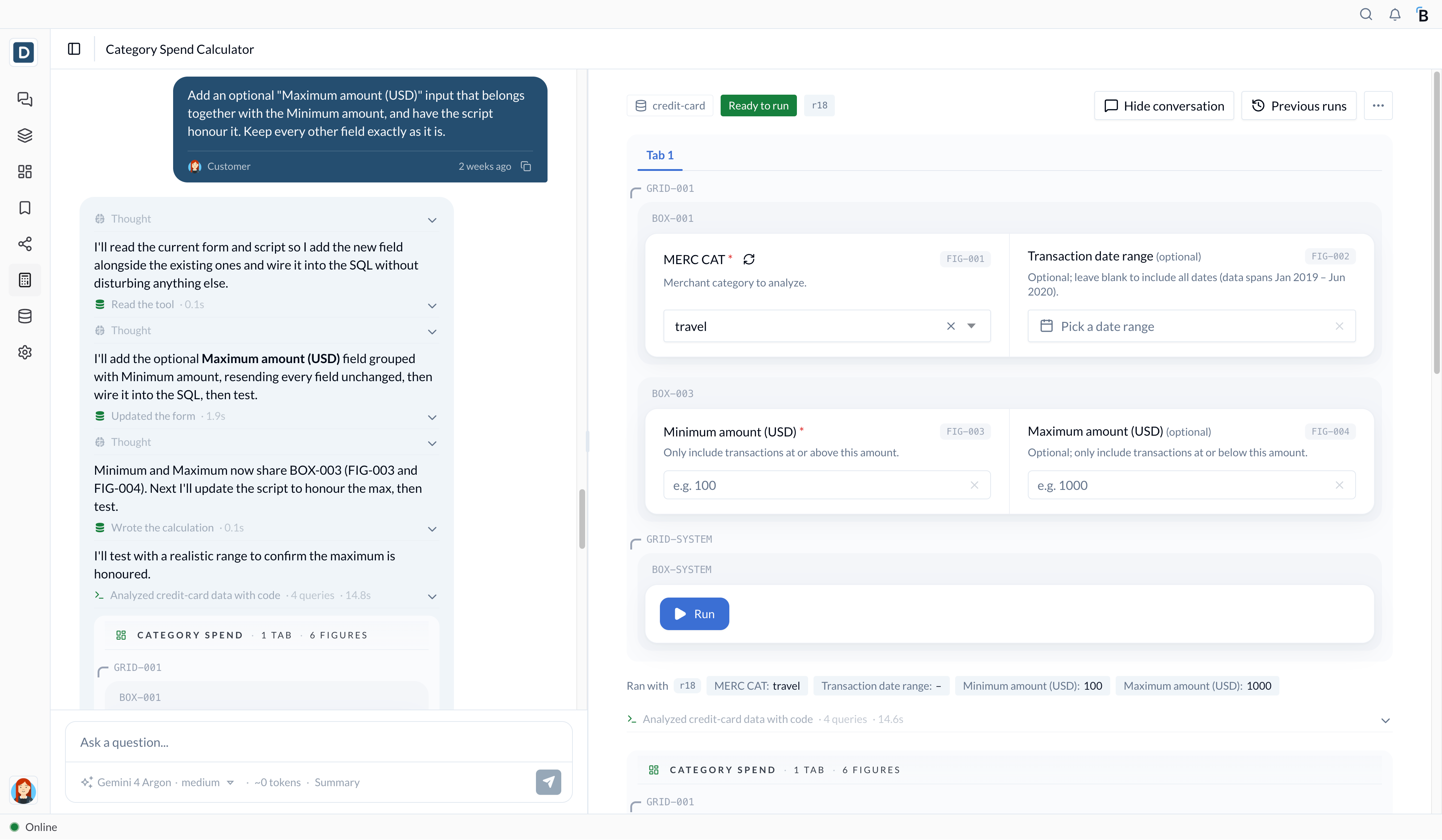
A replay of real revisions and runs from the Beye application: who changed a tool, what changed in the code, and what each run returned.
by the assistant
by the assistant
if min_amount is not None:min_val = max_val = Noneif min_amount is not None and str(min_amount).strip():Grouped with Minimum amount · by the assistant
003 / How it works
Start with one report or spreadsheet. The scary one is a good choice.
01
The data fabric connects to IBM i (AS/400) and the other systems you run, and keeps the tables you choose current with recurring updates.
02
Ask questions of the data in plain language. Each answer shows the query and steps behind it.
03
Turn the inventory review or purchasing calculation into a tool with inputs, backed by real Python, and rerun it with new inputs.
04
Revisions show who changed what. Saved runs keep their inputs, timing and results for reviews and audits.
004 / Trust
Sandboxed Python, revisions and runs you can inspect, and audited controls.
Audited controls, detailed in our Trust Center.
Inspect revisions, code changes, inputs and previous runs.
Put your brand on it for customers and partners.
005 / Questions
IBM i (AS/400) is one of the systems the Beye data fabric connects. A connector reads the tables you choose over ODBC, using the IBM i Access ODBC driver, and can run on a machine at your site. The fabric then keeps that data current with recurring updates. How often each table updates depends on the source and how it is set up.
A database connection does not explain an application’s schema. Custom tables, fields and status codes need review, so we work through them with the people who use the data, starting with the records one workflow needs.
No. Beye works from a current copy of the data you choose, and the IBM i keeps running the business. Beye does not write back to the source today.
No. Beye supplies its own data fabric and keeps source data current, so you can build without finishing a warehouse project first. If you already have a warehouse, it can be a source too.
Yes. The fabric also connects sources such as IBM DB2, SQL Server, Postgres, NetSuite and Salesforce, plus file drops for exports. Older or custom systems can take some extra integration work.
One report, calculation or spreadsheet you rebuild every period, such as an inventory review or a purchasing calculation. We will show you how Beye connects the data behind it and turns it into a tool your team can rerun.
006 / Further reading
How Beye connects the systems you already run, IBM i included, and keeps their data current.
A longer walk through connecting IBM i data, agreeing definitions and keeping reusable tools.
OTIF, fill rate, cost to serve and margin across routes, carriers and warehouses.
007 / Your next step
Tell us which IBM i report or spreadsheet you would start with. A real person on our team reads every note and will reach out to show you how it would run on Beye.
Our engineers love a challenge. Allegedly. 😉
Prefer to talk first? Book a demo.