

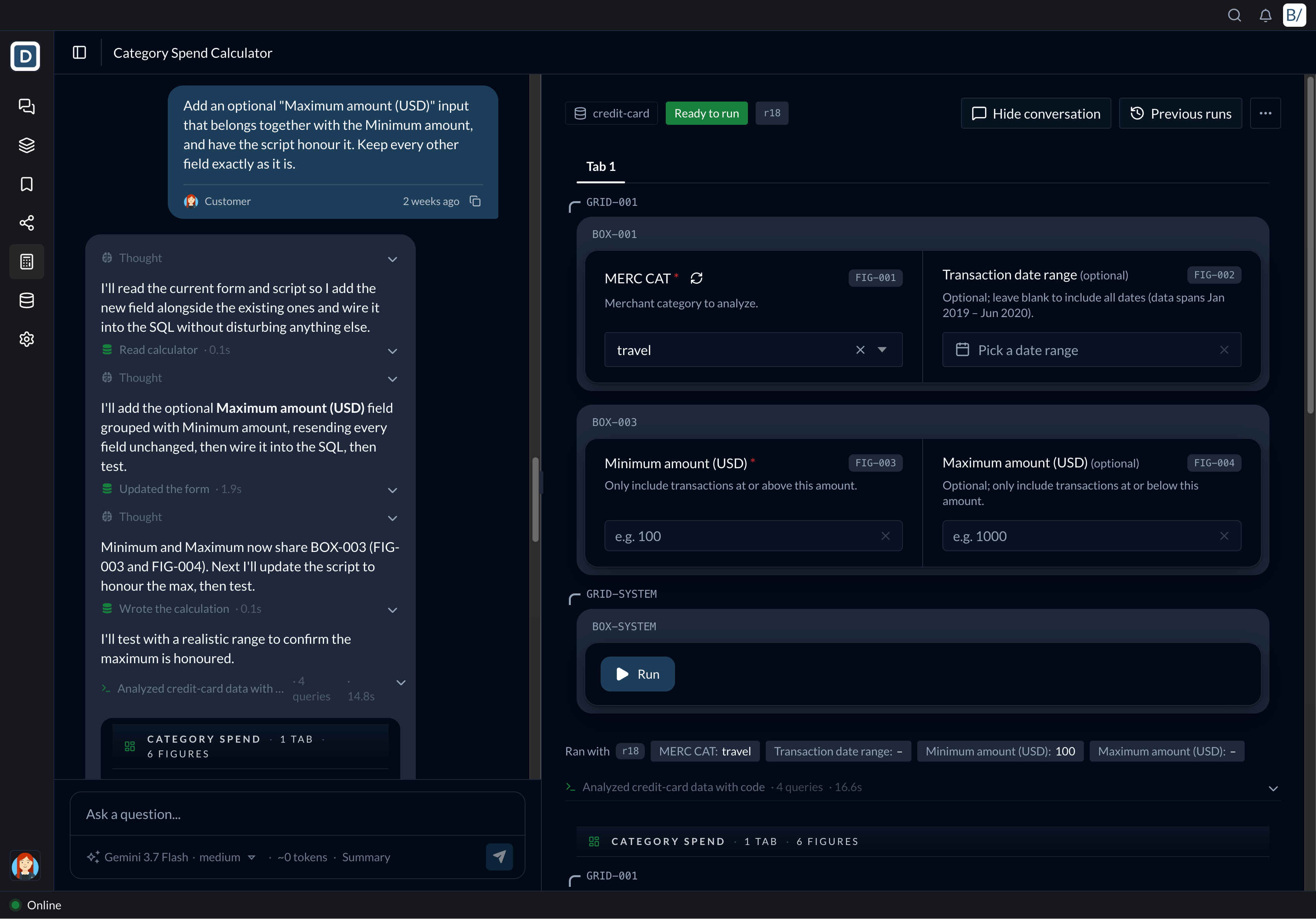
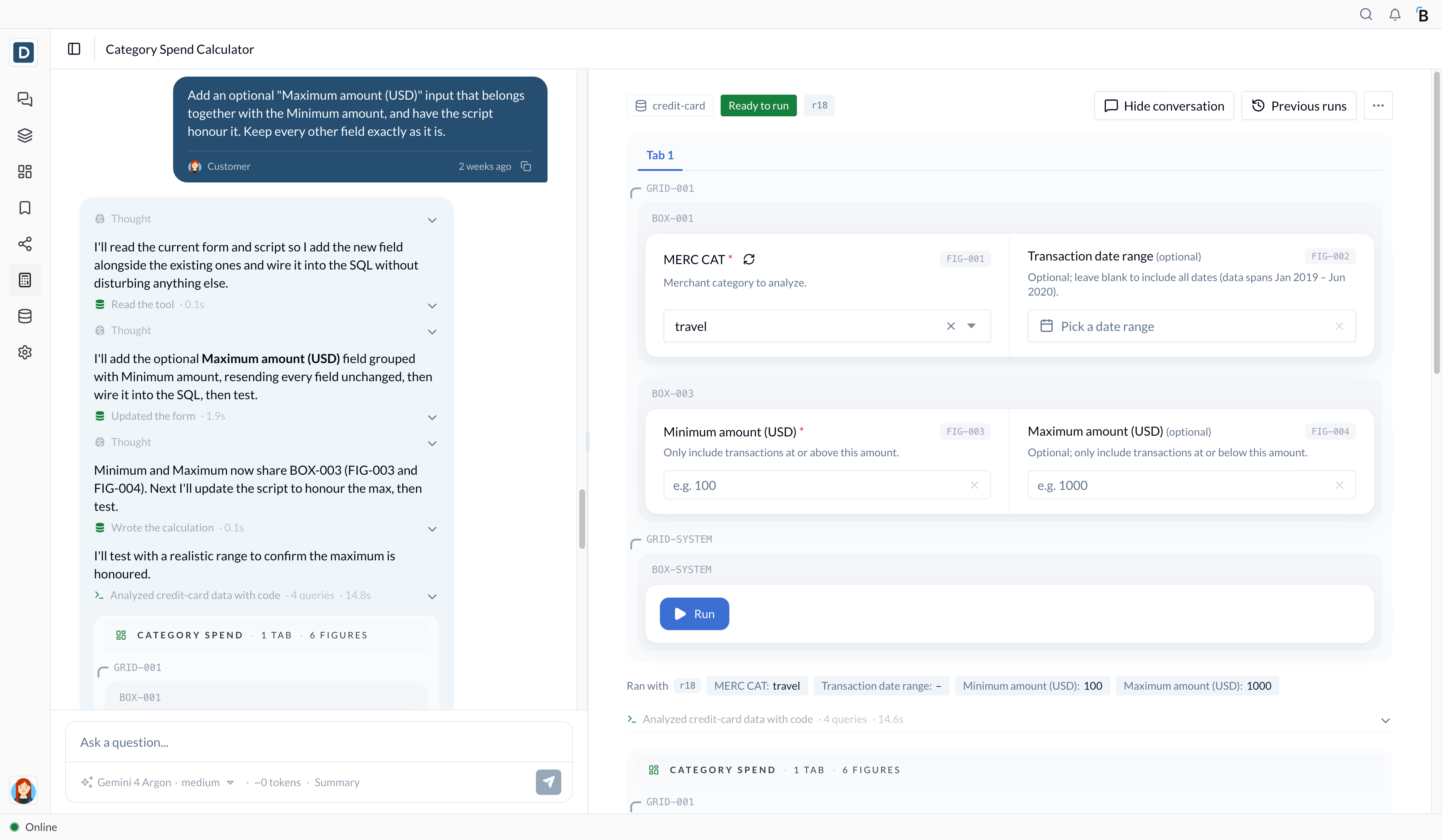
The Beye platform makes every business user a builder, in a safe, secure and IT friendly way, with proper guardrails and just the right amount of constraints. A few days ago I told our CTO, Jason Kummerl, that “it is a tool building platform now for business users like me”, and he said I should capture that feeling and write it down. Business users have wanted this for a very long time, and I have been one of them for more than twenty-five years.
Where I am coming from
I have spent those years in retail supply chains, on both sides of the table. In 2000 I joined Handleman, a vendor managed inventory supplier to some of the largest retailers in the world, as VP of Business Intelligence, and around 2006 I became its CIO. In 2008 I left to start SilkRoute, and then Algo, software for planners, buyers and supply chain leaders.
In every one of those seats I saw the same pattern. The people closest to the work knew exactly what they needed, a margin calculator for a new customer, a what-if for a promotion, a check on which orders are at risk this week. The logic sat in their heads and their spreadsheets, and what they lacked was a safe way to turn it into something the whole team could use. So they waited in the IT queue, or they built it in a spreadsheet that lived on one laptop and broke the week its owner went on vacation.
As a CIO I sat on the other side of that queue, and I understood why IT asks everyone to slow down. IT answers for the data, the security and the audit trail, and a spreadsheet on a laptop leaves all three to chance. Both sides were right, and the business paid for it in time.
At Algo we built a conversational AI assistant for supply chain analytics early in the category, and I hold a patent, granted in 2025, on a virtual assistant that lets a business user set up alerts and pull up analytics in plain language. Asking in plain language was the first step. The second step is a business user who can build.
How a business user builds
You describe what you need to the assistant in plain words. The assistant writes the Python, runs it on your business data and shows its homework, and the result becomes a tool your team can run. Next week you change an input and run it again, and the code stays exactly as it was.
Without rewriting the code.
A tool is a piece of business logic, a formula, a rule or a what-if, written once and given a form so anyone on the team can run it with their own inputs. It works on live business data because Beye Fabric connects to the systems a company already runs, an AS/400, an on-prem ERP, a WMS, the spreadsheets, brings that data together in one place and keeps it current. Custom and legacy sources can need some extra integration work. The tools live in the team’s shared Workspace, with their history, so the team keeps them as people move on.
What IT gets
IT receives four things from day one:
- The code runs in a sandbox, on the company’s own business data.
- Every change is kept, who changed the Python, the form or the layout, along with the inputs and results of past runs, so anyone can go back and inspect them.
- Access is limited by role and Workspace.
- Reports are published to Stacks, where the whole team uses them.
Our Trust Center covers the SOC 2 Type II report and controls.
SOC 2 Type II
Audited controls, detailed in our Trust Center.
Traceable work
Inspect revisions, code changes, inputs and previous runs.
White labeling
Put your brand on it for customers and partners.
I think the right amount of constraints is the design goal. With too few, IT has to step in, and with too many, people go back to their spreadsheets. When a CIO knows every tool runs in a sandbox, carries its history and respects access, the answer to “can my planner build this” becomes yes, and the small things get built by the people who know the work, often the same afternoon they think of them.
What I am seeing
In one of our customer Workspaces we switched on tools a few weeks ago, and activity has been climbing since. Their people are building small tools of their own, mini apps really, inside the guardrails. In another, the customer’s admins publish their own views to their team.
What moves me most is who is building. These are planners, analysts and operations leaders, the people I spent my career building software for, and now they are building it themselves.
The first thing to do
The first thing to do is pick the spreadsheet that only one person understands, or the report someone rebuilds every Monday, and send it to me. We will build it with the person who owns it in a working session on your data, your IT lead is welcome to sit in, and at the end the tool belongs to your team. Let me know what you would build first.